
Artwork Guidelines

Send the right artwork for embroidery, digital print and screen print

Different decoration methods need different artwork. Embroidery is manually digitised into stitches, digital print works best from large high-quality image files, and screen print needs proper vector artwork for clean colour separation.
Embroidery digitising Digital print artwork Screen print vector files Pantone guidance Digital Sample support
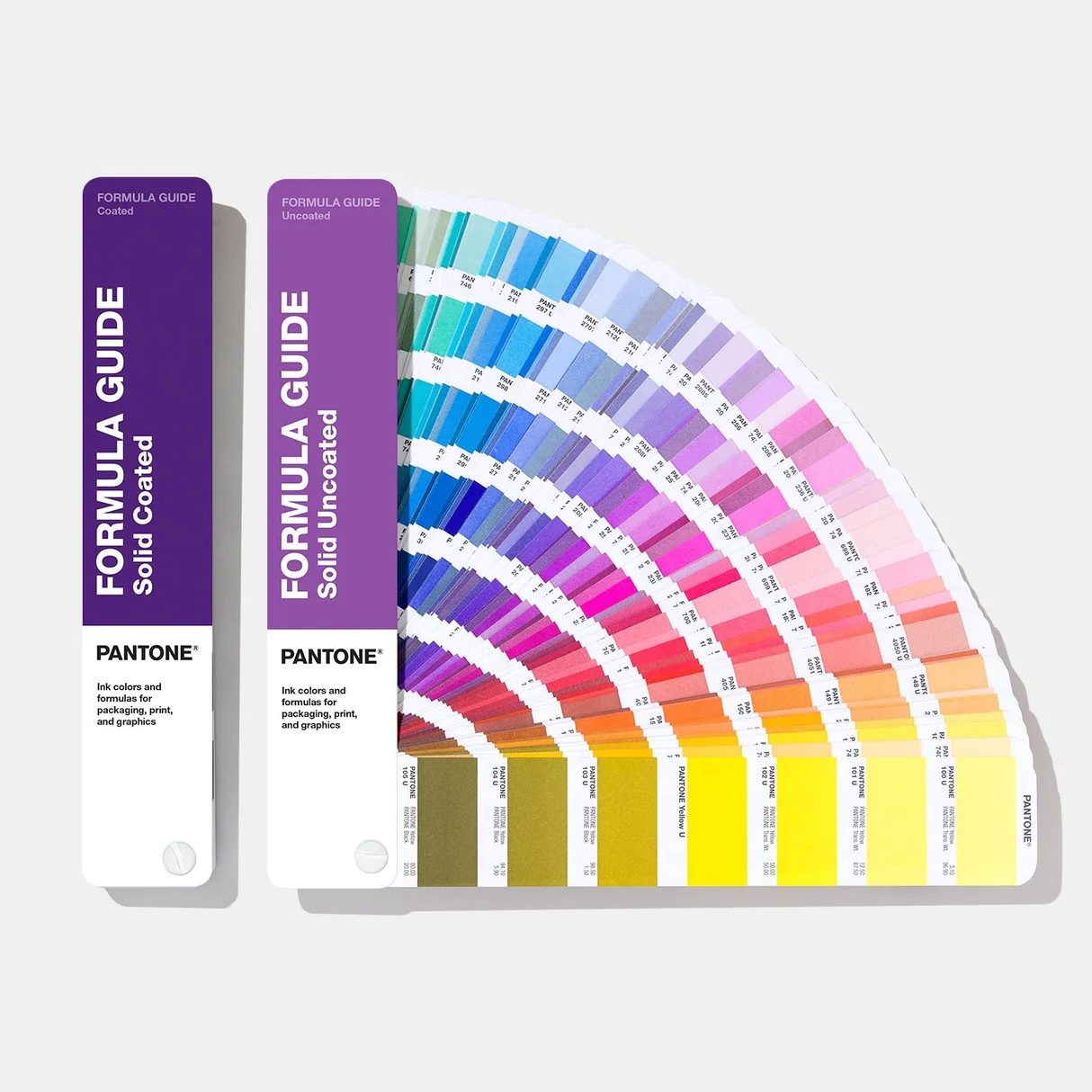
Pantone guidebook used for screen printing colour reference
Pantone matching applies to screen print only. Embroidery colour is limited by available thread colours.
Stitch Embroidery is digitised We draw stitches from your artwork
PNG Digital print loves clean files Large PNGs with transparency work well
AI Screen print needs vector Required for colour separation
5 Screen print colour limit Maximum 5 colours
£20 Embroidery setup note Only applies to some first orders
Accepted file types

XAMAX® accepts the following file types for your decorations

Send the best-quality version of your logo or design that you have. The ideal file type depends on the decoration method: embroidery, digital print and screen print each need artwork for different reasons.

Best overall

.ai

Adobe Illustrator files are excellent for logos, flat colour artwork and screen print setup. They’re also useful for digital print, but not essential for embroidery.
Screen print Digital print Vector
Screen print

.eps

EPS files are usually strong for vector logo artwork and screen print preparation, provided the artwork is properly created as vector shapes.
Screen print Logos Vector
Depends on file

.pdf

PDFs can be useful if they contain proper vector artwork. A PDF can also contain a low-quality image, so the quality depends on how the PDF was created.
Can be vector Can be raster Useful
Great for digital print

.png

A large, high-quality PNG with a transparent background can produce excellent digital print results. It’s also fine for embroidery because we digitise the design into stitches.
Digital print Embroidery Transparent background
Large files only

.jpg / .jpeg

JPG files are acceptable for digital print if they are large, detailed and not heavily compressed. They can also be used for embroidery digitising.
Digital print Embroidery High-res only
Design file

.psd

Photoshop files can be useful for digital print artwork, especially where layers, transparency or design elements need to be checked.
Digital print Layered file Raster
Reference only

.doc / .docx

Word files are useful for instructions, layout notes or reference images, but they are rarely suitable as final production artwork by themselves.

Reference Instructions Not ideal
We'll help

Not sure what you have?

Send the file anyway. If there’s a problem with the artwork, XAMAX® will let you know before production where possible.

8Mb Max

Large files

Website uploads should be kept to 8MB where possible. Larger artwork can be shared with a WeTransfer or Google Drive link.

Upload limit Share by link
Raster vs vector

Raster vs Vector: what it means for your logo

Raster and vector files can look similar at normal size, but behave very differently when enlarged. That difference matters most for digital print and screen print, while embroidery is manually digitised into stitches so matters less.
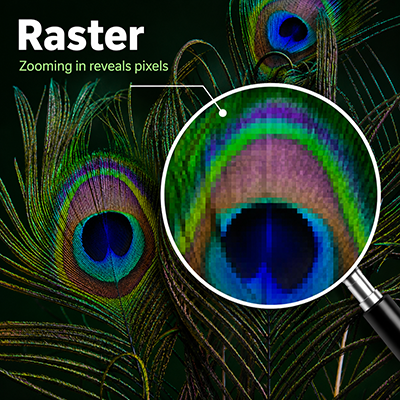
Zoomed-in raster artwork showing visible pixelation
Raster images can become pixelated when enlarged.
Pixel based

Raster images are made from pixels

JPG, PNG and PSD files are usually raster images. For digital print, a large detailed raster file can work very well. A high-quality PNG with a transparent background is often a strong option.
Best used for
  • Digital print where the file is large and detailed
  • Full-colour designs and photo-style artwork
  • Embroidery digitising where the logo is clear enough to trace
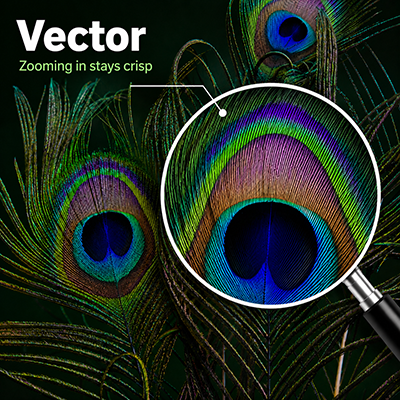
Zoomed-in vector artwork staying sharp when enlarged
Vector artwork stays sharp because it scales cleanly.
Path based

Vector artwork is built from shapes

AI, EPS and some PDF files can contain vector artwork. Vector files scale cleanly and allow shapes and colours to be separated, which makes them essential for screen print setup.

Best used for
  • Screen print artwork
  • Flat colour logos and clean text
  • Designs that need clean colour separation
Better artwork, better results

Higher-quality files give digital print more detail to reproduce

For digital print, the finished result is heavily influenced by the artwork supplied. A large, detailed file gives the print process more information to work with. A small or blurry file cannot magically produce sharp detail.

  • Send the original logo or artwork file where possible, not a screenshot.
  • For digital print, large PNG files with transparent backgrounds are ideal where available.
  • Large, detailed JPG files can work well if they are not heavily compressed.
  • Avoid tiny images copied from websites, email signatures or social media.
  • Use vector artwork for screen print because colour separation is required.
  • For embroidery, clear artwork is helpful, but XAMAX® manually digitises the design into stitches.
Embroidery, digital print and screen print

Different decoration methods need different artwork

XAMAX® will use the most suitable decoration method for your garment, design and order type. The right artwork helps keep production smoother and avoids unnecessary delays.

Stitched finish

Embroidery

Embroidery is not printed from your image file. XAMAX® digitises the design by drawing each stitch over the artwork, then the embroidery machine stitches the design using thread.

What matters most
  • A clear version of the logo to trace
  • Simple shapes and readable text
  • No gradients or photographic detail
  • Colour matched to available thread colours, not Pantone
High detail

Digital print

Digital print is flexible and works well for full-colour designs, detailed artwork and logos with gradients. Large, clean image files can produce excellent results.
Best artwork
  • Large PNG with transparent background
  • Large, detailed JPG where PNG is unavailable
  • Vector files are excellent but not mandatory
  • Original artwork, not a screenshot
Vector required

Screen print

Screen print requires proper vector artwork so each colour can be separated cleanly. XAMAX® screen print is limited to a maximum of 5 colours.

Important pricing note
  • Vector artwork is required
  • Maximum 5 colours
  • Only screen print can be matched to Pantone
  • Online screen print prices are for one colour unless stated otherwise
  • Additional colours incur extra setup cost
Embroidery setup

Embroidery setup is free on most first orders

For embroidery, XAMAX® digitises your logo by turning the artwork into a stitch file. In most cases, that setup is included as part of your order.

  • Embroidery setup is free when your first embroidery order is £100 ex VAT or more.
  • A £20 setup fee only applies if it is your first embroidery order and the order is below £100 ex VAT.
  • If the setup fee applies, an account manager will contact you to arrange payment.
  • XAMAX® keeps your logo artwork on file, so future embroidery orders using the same logo do not need the setup fee again.
Pantone guidebook used for screen print colour reference
Pantone matching applies to screen print only. Embroidery colours are selected from available thread ranges.
Colour guidance

Pantone, thread colours and print colours are not the same thing

Colour matching depends on the decoration method. Screen print can be matched to Pantone, digital print uses a print process, and embroidery is limited by the thread colours available.

  • Only screen print can be matched to Pantone references.
  • Embroidery colour is limited to available thread colours.
  • Flame-retardant embroidery thread has a more limited colour choice.
  • Digital print colours can vary depending on artwork, garment colour, fabric and production method.
  • Screens, fabrics, thread and ink can all affect how colours appear.
  • If exact colour is important, include clear colour notes when sending artwork.
Sending your artwork

Include the file, the colours and the placement notes

Artwork issues are easier to solve before production starts. Include as much useful information as possible when you upload artwork or send files to XAMAX®.

1

Upload the best file you have

Send the original logo or artwork file where possible. If you only have a JPG, PNG or Word document, send it anyway and we’ll advise if there is a problem.

2

Add colour instructions

Include Pantone references, brand colours or practical colour notes. This helps avoid guesswork when artwork is converted into print or embroidery.

3

Tell us where it goes

Add notes such as left breast, right breast, sleeve, nape or back print. XAMAX® can then prepare a Digital Sample for checking where appropriate.

Large file?

If your artwork is larger than the website upload limit, send a WeTransfer or Google Drive link with your order notes or message.

Artwork FAQ

Artwork questions before you order

Quick answers for businesses sending logos, designs and decoration instructions for workwear, uniforms and promotional clothing.

What is the best file type to send?

It depends on the decoration method. For screen print, send AI, EPS or vector PDF artwork. For digital print, a large PNG with a transparent background is excellent, and a large detailed JPG may also work well. For embroidery, a clear image is usually enough because XAMAX® digitises the design into stitches.

Does embroidery need vector artwork?

Not usually. XAMAX® manually digitises embroidery artwork by drawing stitches over the supplied image or logo. Clear artwork helps, but vector files are not normally essential for embroidery.

Can gradients be embroidered?

No, not in the same way they appear in a print file. Embroidery uses thread, so gradients, shadows, photographic detail and very fine detail may need to be simplified into a practical stitched design.

Can embroidery colours be matched to Pantone?

No. Embroidery colours are limited by available thread colours. If flame-retardant thread is required, the colour choice is even more limited.

Why does screen print need vector artwork?

Screen print needs artwork that can be separated cleanly into shapes and colours. Proper vector artwork makes this possible. XAMAX® screen print is limited to a maximum of 5 colours.

Are online screen print prices for full-colour print?

No. Unless otherwise stated, screen print prices displayed on the website are for a single colour screen print. Additional colours require additional setup and will incur extra cost.

When does the £20 embroidery setup fee apply?

Embroidery setup is free on first embroidery orders of £100 ex VAT or more. A £20 setup fee may apply if it is your first embroidery order and the order value is below £100 ex VAT. Once your logo has been digitised, XAMAX® keeps it on file so future embroidery orders using the same logo do not need the setup fee again.

What happens if my artwork is not good enough?

If there is a clear artwork problem, XAMAX® will usually contact you before production to discuss the issue, request a better file or agree the most practical way forward.

Ready to add your logo?

Send us the best artwork you have

Choose your garments, upload your logo where prompted, or contact XAMAX® if you’re unsure whether your artwork is suitable for embroidery, transfer print or screen print.

Copyright © 2025 XAMAX® Clothing Company Ltd. All rights reserved. Registered in England & Wales #04248565 | VAT #(GB)518093054 | ICO Registered #Z1178677